Dark Web Intelligence Platform
YOUR DATA IS ALREADY OUT THERE.
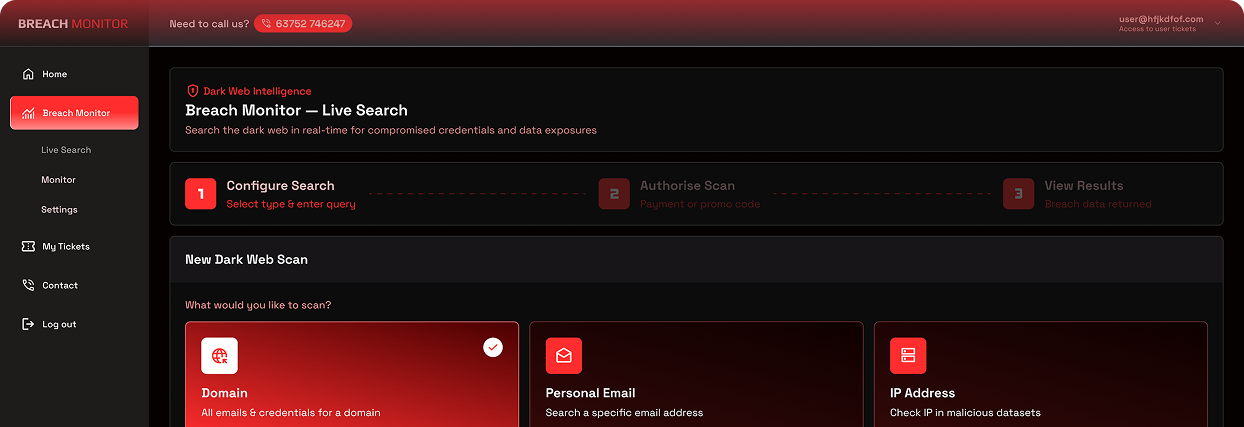
We scan the dark web every day for your domain, emails and IP addresses — alerting you the moment your credentials appear in a breach, before attackers can use them.
24 B+
Credentials in circulation on the dark web
£4.5 M
Average cost of a data breach (IBM Security)
197
Average days before a breach is detected
81 %
Of breaches involve stolen or weak passwords
The threat landscape
WHY YOU NEED TO MONITOR THE DARK WEB
The dark web is a hidden part of the internet that operates outside standard search engines and browsers. It is where cybercriminals buy, sell and trade stolen data — including the login credentials of your employees and customers.
Every time a website, app or service your staff have ever registered on suffers a data breach, that data ends up on the dark web. Once there, it is compiled into massive lists and sold to attackers who use it to attempt to log into your business accounts — email, cloud services, banking, and more.
This is called credential stuffing— and it is one of the most common attack methods used against businesses today. Most organisations have no idea their data is out there until it is too late.
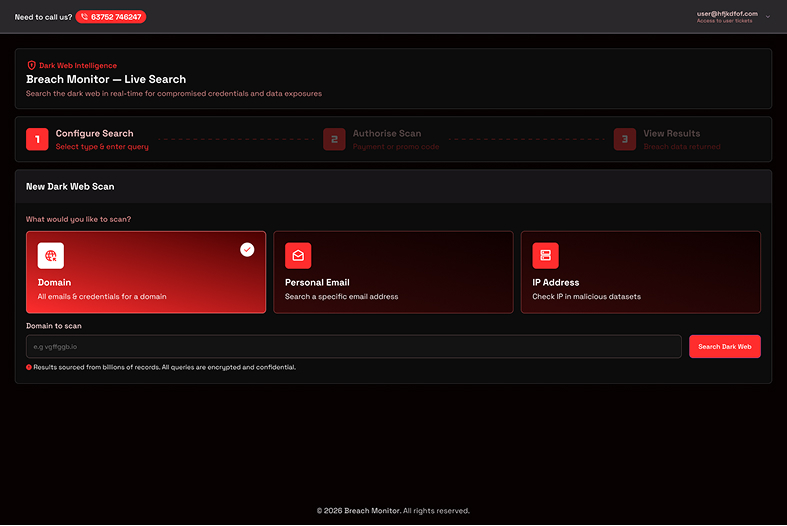
Breach Monitor gives you visibility. We continuously scan the dark web searching specifically for your email domain, individual addresses and IP addresses — so you know the moment your data appears.
Understanding the threat
WHAT IS THE DARK WEB?
Think of the internet in three layers. The surface web is what you find on Google. The deep web is your email inbox, banking portals — private but not sinister. The dark web is intentionally hidden and requires specialist software to access. It is where criminal forums operate, where stolen databases are auctioned, and where credentials from every major breach in the last decade are bought and sold for pennies per record.
Finding your data on the dark web does not necessarily mean you have been directly hacked. It most commonly means a service you or your team use has been breached, or credentials were entered on a fraudulent website — and that data has since found its way into criminal hands.
Regardless of origin, the risk is identical: attackers have your login details and will attempt to use them. Early detection is everything.
Platform overview
HOW BREACH MONITOR WORKS
We run automated scans against hundreds of dark web sources on your chosen schedule — from daily to one-off — and alert the right people the moment we find something.
STEP ONE

01
You register your assets
Add the email domains, individual addresses and IP addresses you want monitored. You can add multiple assets and manage them all from one dashboard.
STEP TWO

02
We scan continuously
Our platform searches billions of records across dark web forums, paste sites, breach databases, hacker marketplaces and data dumps — on your chosen schedule.
STEP THREE

03
Instant alerts. Fast action.
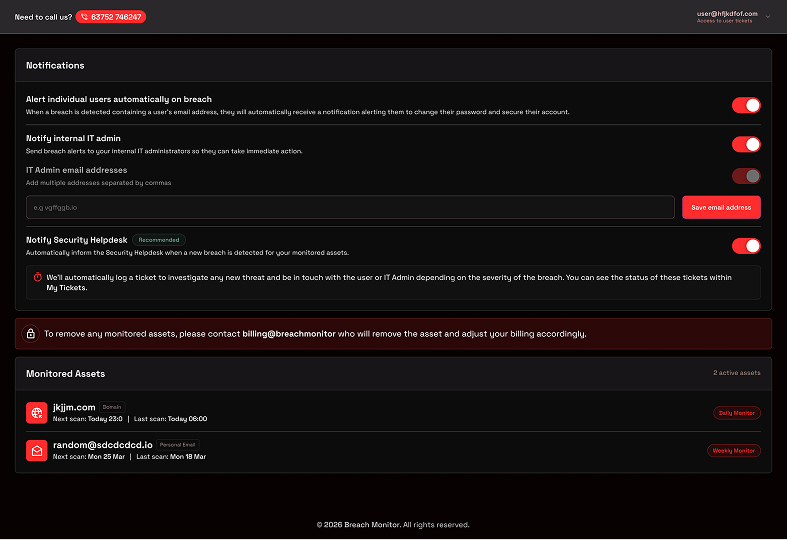
The moment your data appears, we alert the affected user, your IT administrator, and our security helpdesk — simultaneously — so credentials can be changed before attackers act.
Breach response
WHEN WE FIND A BREACH
Detection is only half the battle. When our scanner identifies your data in a breach, an automated response chain fires — getting the right information to the right people within the same scan cycle. The speed of detection depends directly on how frequently you scan: daily monitoring means you'll know within 24 hours of data appearing; weekly within 7 days. This is why we strongly recommend daily or weekly scanning as a minimum.
01
On next scheduled scan
You register your assets
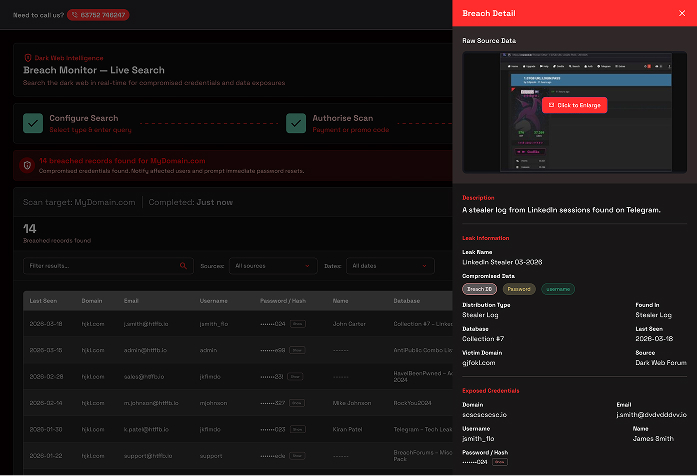
Our scanner identifies your credentials in a newly indexed breach source. The exact email, source database, exposure type and data fields are logged.
02
Within minutes of scan completing
Affected user notified
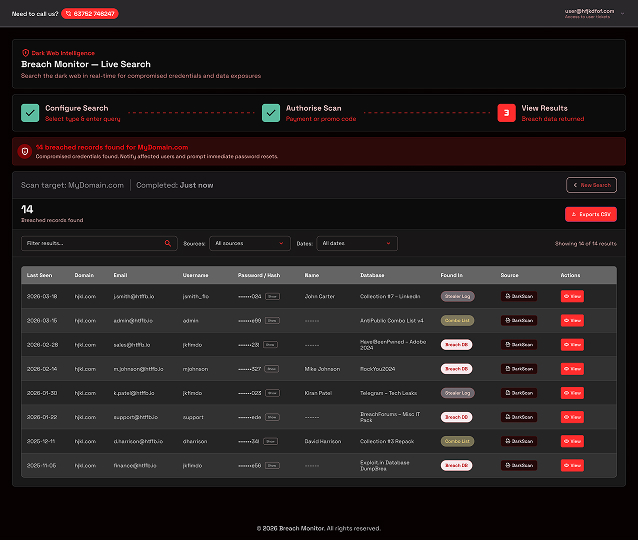
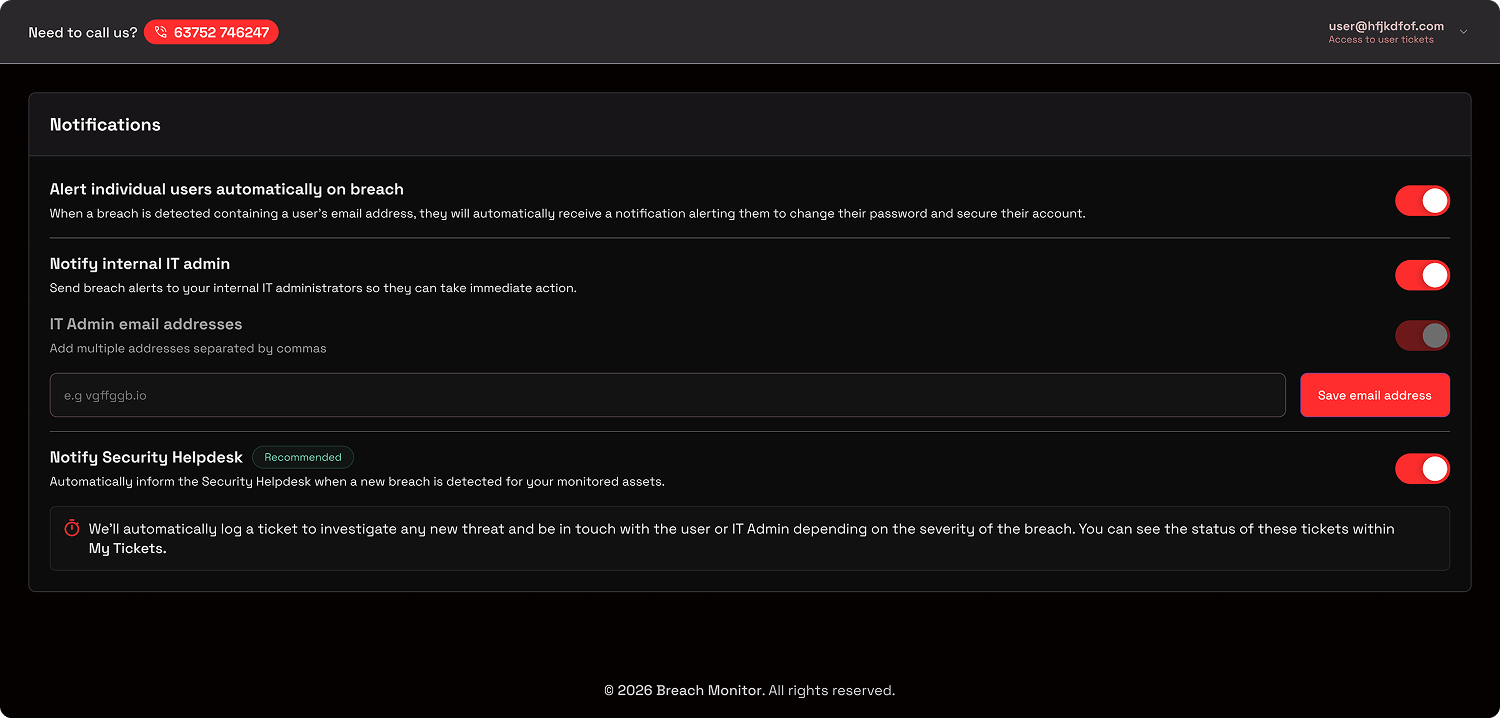
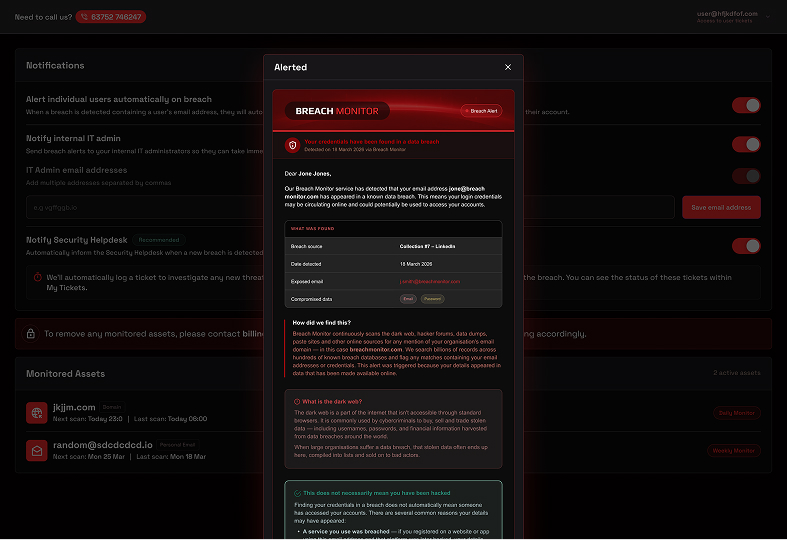
The user whose credentials were found receives an automated email explaining what was found, what it means, and the immediate steps they need to take — including changing their password.
User email
03
Simultaneously — same scan cycle
IT admin alerted
Your registered IT administrators receive a detailed technical alert including the full breach record — so they can verify the credentials have been changed and audit for any account compromise.
IT Admin email
04
Automatically — same scan cycle
Security helpdesk ticket raised
A ticket is automatically created with our security helpdesk. Depending on severity, our team contacts the affected user or IT administrator to assist with credential rotation and investigate any suspicious activity.
Helpdesk ticket
Partner alert
05
Ongoing — Tracked in portal
Full visibility in your portal
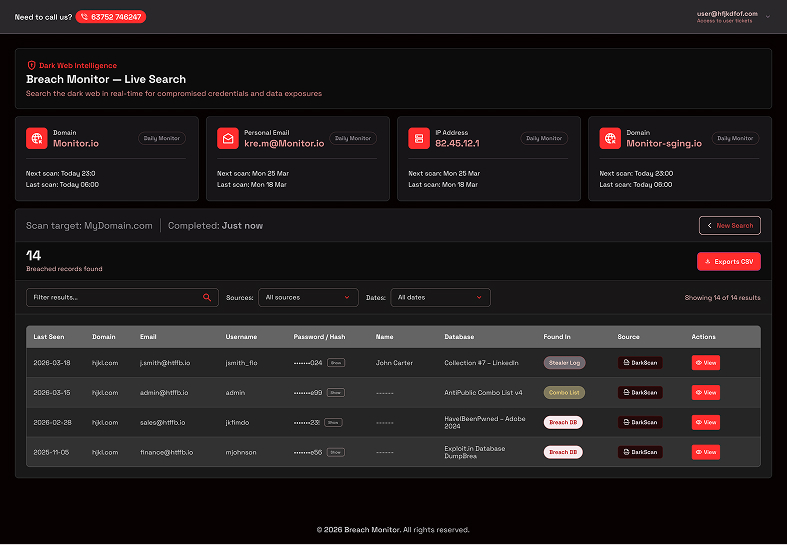
Every breach, every action, every ticket — all visible in your partner portal under My Tickets. Authorised team members can also view compromised credential data to verify passwords are no longer in use.
Portal access
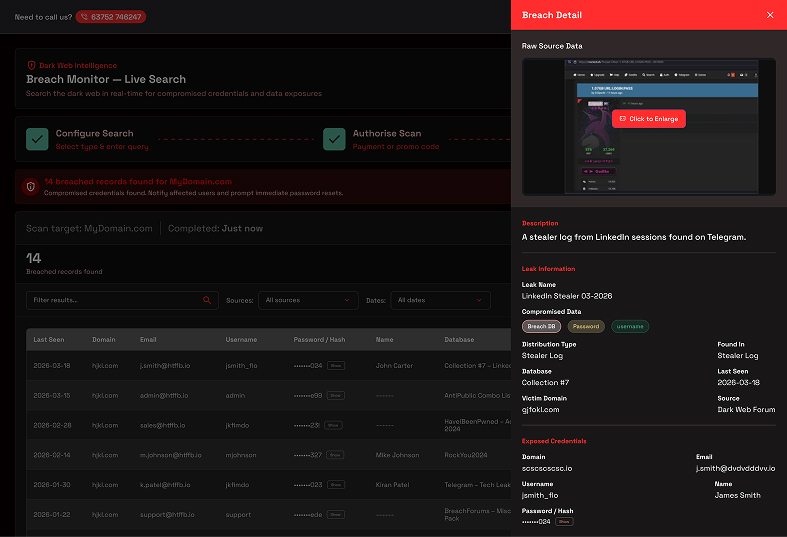
Authorised access
Authorised portal users can view the full compromised credential data — including exposed passwords — allowing IT teams to check whether those passwords are still in use across your systems and force resets where necessary.
Coverage
WHAT WE SCAN FOR
Breach Monitor searches across three key asset types — giving you comprehensive coverage of your organisation's digital footprint on the dark web.

Email domain
Add the email domains, individual addresses and IP addresses you want monitored. You can add multiple assets and manage them all from one dashboard.
Scans all: *@yourdomain.com

Personal email addresses
Monitor specific individual email addresses — useful for executives, IT administrators or employees who use personal accounts for work purposes and may be at higher risk.
Scans : example@example.com

IP addresses
Detect whether your organisation's public-facing IP addresses have appeared in malicious datasets, attack listings or dark web discussions — an early indicator of targeting.
Scans all: 82.45.12.1
The cost of inaction
WHAT HAPPENS IF YOU DON'T MONITOR?
Without dark web monitoring, your compromised credentials sit undetected — sometimes for years. Attackers don't announce themselves. They simply log in.

Average 197 days to detect a breach
Without proactive monitoring, most organisations only discover a breach after significant damage has already been done — through a customer complaint, a fraud incident, or a ransomware attack.

Credential reuse opens every door
If a staff member uses the same password across multiple services and one is breached, attackers gain access to all of them. Without monitoring, you never know which passwords to reset.

Financial and reputational damage
The average UK data breach costs £4.5 million. Beyond financial loss, regulatory fines under GDPR, customer notification obligations and reputational damage can be devastating for businesses of any size.

You become an easy target
Attackers specifically search dark web databases for corporate email domains and use automated tools to try those credentials against Microsoft 365, Google Workspace, VPNs and banking portals. Unmonitored organisations are the easiest to attack.

Compliance exposure
UK GDPR requires organisations to take appropriate measures to protect personal data. Failing to monitor for known credential exposures could be considered a failure of due diligence in the event of a regulatory investigation.

Attackers have a head start
By the time you notice something is wrong — an unfamiliar login, a suspicious email, missing files — attackers may have already been inside your systems for months. Monitoring closes that window dramatically.
15M
Records added daily
New stolen credentials appear on the dark web every single day
60%
Of SMEs close within 6 months
After suffering a significant data breach or cyber incident
3,400
Dark web sites monitored
Across forums, paste sites, marketplaces and data dumps
<1hr
Alert response time
From detection to notification when a breach is discovered
Incident response
YOUR DATA WAS FOUND. WHAT DO YOU DO NEXT?
Finding your data in a breach doesn't have to mean disaster — but speed matters. Here's exactly what to do the moment you receive a breach alert, depending on what was exposed.

If your password was exposed
STEP ONE
Check if it's a common password
If the exposed password is something simple like Password1! or your company name, it is likely in use by others too and actively targeted. Replace it immediately with a long, unique passphrase of at least 14 characters.
STEP TWO
Reset the password and revoke all sessions
Changing the password is not enough on its own. Revoke all active sessions on the affected account so anyone already logged in — including a potential attacker — is immediately signed out. Most platforms offer a "sign out everywhere" option in security settings.
STEP THREE
Reset it everywhere else you used it
If that password was used on any other service — even once — treat those accounts as compromised too. Attackers run automated tools that try stolen credentials against hundreds of platforms within minutes. Change every account that shared that password.
STEP FOUR
Enable two- factor authentication
Once the password is reset, immediately enable 2FA on the account if not already active. Even if the new password is later exposed in another breach, 2FA means an attacker still cannot access the account without a second form of verification.
STEP FIVE
Check for suspicious activity
Review the account's login history, sent emails, connected apps and any recent changes to account settings. Look for logins from unfamiliar locations or devices. If anything looks unusual, contact your IT team immediately — do not wait.
STEP SIX
Use a password manager going forward
The root cause of most credential breaches causing wider damage is password reuse. A password manager generates and stores a unique, complex password for every single account — so one breach can never cascade into many. This is the single most impactful security habit you can build.
If personal data was exposed
Email addresses, names, home addresses & personal data

You can't undo a personal data exposure
Unlike a password, you cannot change your name, date of birth or home address. When this type of data is breached, the priority is awareness and vigilance rather than remediation. Knowing your data is out there lets you stay alert to how it might be used against you.

Know which platform was breached
Identify which service your data came from. If that platform held any sensitive or confidential information — financial records, health data, business documents — consider what a criminal could do with it and take steps accordingly. Notify relevant parties if required under GDPR.
Be alert to phishing and social engineering
Criminals use personal data to craft convincing phishing emails. If your name, employer, address or other personal details are circulating, expect targeted emails that reference this information to make themselves seem legitimate. Be especially cautious of unsolicited messages.
Notify your IT team and review third-party access
If business data was included in the breach — even indirectly — your IT team needs to know. Review any third-party services that have access to your systems and consider whether the breached platform had integration into your business accounts.


The golden rule: Authorised portal users can view the full compromised credential data — including exposed passwords — allowing IT teams to check whether those passwords are still in use across your systems and force resets where necessary.
Packages
CHOOSE YOUR SCAN FREQUENCY
We recommend daily or weekly monitoring as a minimum. The faster you know about a breach, the faster you can act — and the less damage gets done.

One-off scan
£39+VAT
Single Dark Web Scan
Instant results, no subscription needed- Full dark web scan
- Domain, email or IP scan
- Instant breach report
- Password & hash visibility
- One-time cost


Daily monitoring
£49/mo +VAT
Daily scanning with real-time breach alerts.
- Initial dark web scan
- Breach alert emails
- IT admin notification
- Helpdesk ticket on alert
- Multiple assets in one place

12 month minimum commitment
Weekly monitoring
£19/mo +VAT
Weekly scanning with real-time breach alerts
- Initial dark web scan
- Breach alert emails
- IT admin notification
- Helpdesk ticket on alert
- Multiple assets in one place
12 month minimum commitment
Monthly monitoring
£9/mo +VAT
Monthly scanning with real-time breach alerts
- Initial dark web scan
- Breach alert emails
- IT admin notification
- Helpdesk ticket on alert
- Multiple assets in one place
12 month minimum commitment
Getting started
START IN MINUTES. PROTECT INDEFINITELY.
You don't need any technical knowledge to get started. A one-off scan gives you an immediate picture of your exposure. Ongoing monitoring keeps you protected every day.
Start with a one-off scan
Not ready to commit? A single scan tells you immediately if your email domain appears in any known breach database — for just £39. It takes under 60 seconds and the results are eye-opening.
Register for ongoing monitoring
Set up weekly or daily monitoring and forget about it. We run the scans automatically, alert the right people when something is found, and provide a complete audit trail in your portal.
Monitor multiple assets
Add your email domain, key individual addresses and business IP addresses — all monitored from a single dashboard. Ideal for businesses that want comprehensive coverage across their entire digital footprint.
Get in touch
READY TO SEE


READY TO SEE
WHAT'S OUT THERE?
Whether you want an immediate one-off scan or are ready to set up ongoing monitoring, get in touch and we'll have you covered quickly.
Response within one working day
We'll review your enquiry and get back to you with the best next steps for your organisation.
No commitment required
Start with a one-off scan for £39 to see exactly what's exposed before committing to ongoing monitoring.
Set up in under an hour
Once you're ready to monitor, we'll have your assets configured and scanning within the same working day.
UK GDPR compliant
Your data and your customers' data is always handled in line with UK GDPR. We never share information with third parties.
We'll respond within one working day. Your data is handled in accordance with UK GDPR and is never shared with third parties.